Digital wedding guestbooks: ideas, prompts and wording
How a digital guestbook works alongside your photos, prompts that get guests writing, and wording for your sign.
Updated · 6 min read·By the DropSnaps team
Questions people ask
What is a digital wedding guestbook?
A place where guests leave you a message from their phone instead of a pen-and-paper book. With DropSnaps the guestbook sits next to the photos, so a note can come with a picture and it's all kept together.
Can guests who couldn't come sign it?
Yes. Send them the link and they can leave a message and see the photos from wherever they are.
A guestbook is one of the few wedding keepsakes you'll read again and again. A digital one sits next to your guests' photos, so the messages and the pictures from the day stay together, and guests who couldn't make it can sign it too.
How a digital guestbook works
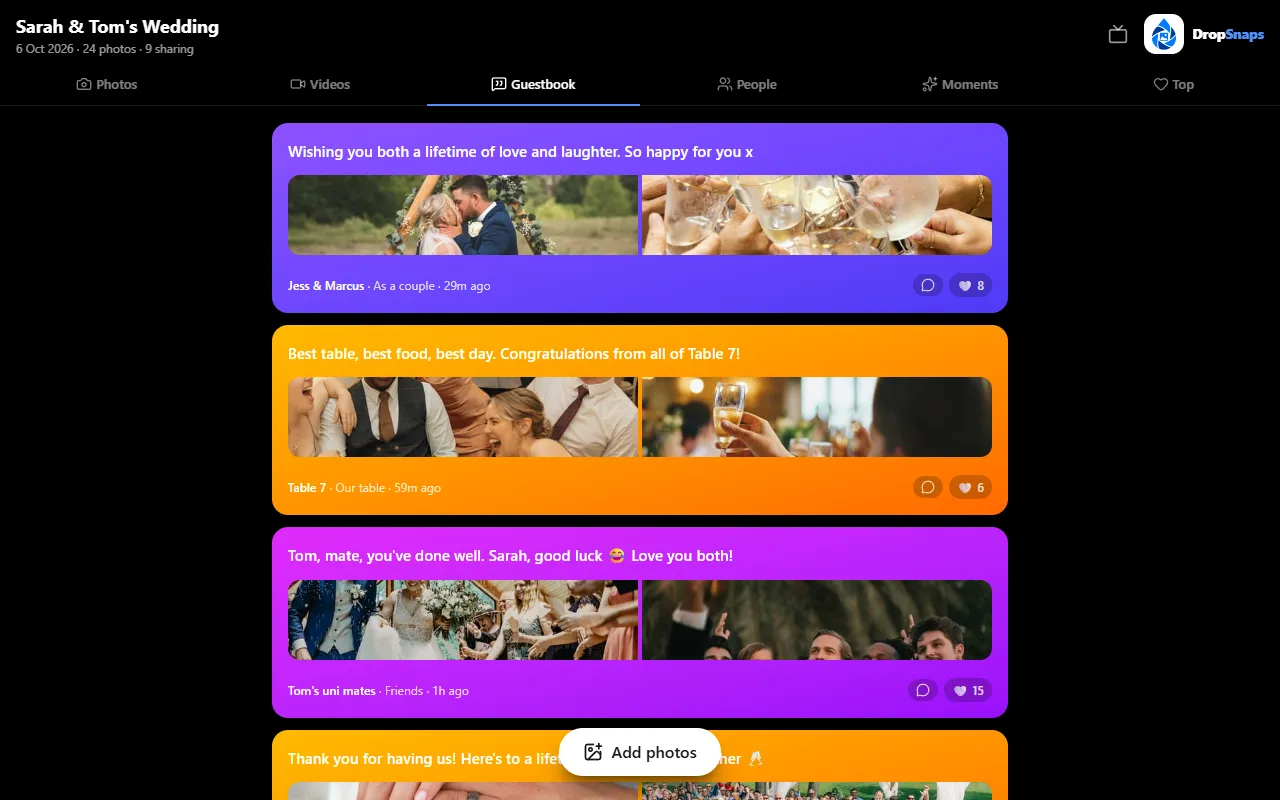
Instead of a book and a pen on a table by the door, guests leave you a message from their phone. With DropSnaps, the guestbook is part of your event: guests scan the same QR code they use for photos, write a note and, if they like, attach a photo to go with it. Every message appears on the Guestbook tab, where everyone can read them.
Messages in the guestbook, next to the photos from the day
Why couples choose one
Nothing to lose. No book left behind at the venue, no pages smudged with prosecco.
Everyone can sign. Guests who couldn't come can leave a message from wherever they are.
Messages come with photos. A note from your university friends next to the photo of all of you on the dance floor.
Guests write more. A phone keyboard is easier than squeezing a message onto half a page, especially late in the evening.
Plenty of couples keep a paper book as well. They do different jobs: the paper book for the signatures and the doodles, the digital one for the longer messages and the photos.
Prompts that get guests writing
"Congratulations!" is lovely, but it's not much to read in ten years' time. A prompt on the sign or the table card gets guests writing something you'll remember. Pick one or two:
Your best advice for a happy marriage
Your favourite memory of us
How you know us, and when you first met
A date-night idea for our first year
A song that should be on our playlist
Where you think we'll be in ten years
The moment from today you'll remember
A wish for our future
What you'd say in a toast if you had the microphone
A recommendation for the honeymoon
Wording for your sign
Keep it short, and say where to find it:
"Leave us a message: scan the code and sign our guestbook"
"Words for the newlyweds: scan to sign our digital guestbook"
"Can't find a pen? Scan here to leave us a note, and a photo if you like"
"Tell us your favourite memory of us: scan to sign"
If you're also collecting photos with the same QR code, one sign can do both: "Share your photos and sign our guestbook: scan me".
When to ask
At the drinks reception, when guests are mingling and have time.
After the meal, when the announcement about photos goes out. Mention the guestbook in the same breath.
The morning after, in the same reminder you send for photos. Some of the best messages are written the next day.
Keeping the messages
The messages stay with your event for as long as it's kept, on the Guestbook tab next to the photos. Read them on the way home, then save your favourites before the event's time runs out: copy them into a keepsake book, or print a few alongside your favourite photos.